What’s New in X360 — October 2026?
The October 2026 X360 update introduces the new WhatsApp QR Module, expanding how businesses can connect and manage WhatsApp conversations inside X360.
The module brings together:
WhatsApp QR Login
Shared Web Inbox
One WhatsApp number per workspace
Real-time messaging updates
Canned Replies and CRM Merge Fields
Multiple WhatsApp message types
Tenant isolation
The result is a centralized workspace for businesses that want to connect a WhatsApp number and allow their teams to manage conversations from one interface.
1. WhatsApp QR Login
X360 now supports connecting a WhatsApp number using a QR code.
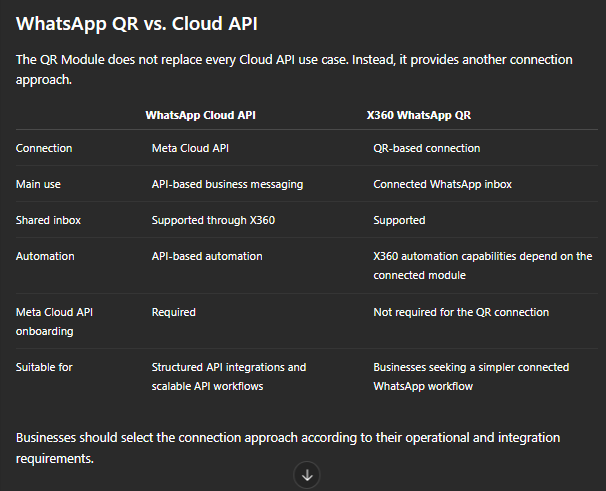
This connection approach does not use the WhatsApp Cloud API connection model and does not require the same Cloud API onboarding process.
It can therefore provide a practical option for businesses looking for a direct WhatsApp connection and shared inbox experience.
Example: Local service business
A home maintenance company may already operate a WhatsApp number used by its customers.
The business can connect the number through QR and provide its customer-service team with access to the shared X360 workspace.
2. Shared Web Inbox
The new Web Inbox provides a centralized environment for managing WhatsApp conversations.
Available capabilities include:
Chat list
Search
Filters
Archive
Favorites
Mute
Emoji
Voice notes
Locations
Contact cards
CRM merge fields
Why does this matter?
Instead of managing customer conversations individually, teams can work from one shared workspace.
Example: Real estate
A property sales team can manage inquiries from buyers through a centralized inbox.
Agents can search conversations, review customer history and respond using the same business WhatsApp workspace.
3. One WhatsApp Number Per Workspace
The QR module supports one connected WhatsApp number per tenant/workspace.
The connected number can then be used by the workspace team through the shared inbox.
This model is particularly relevant for businesses where multiple employees need to work with customers through one official business number.
Example
A clinic may have:
One WhatsApp number → One X360 workspace → Multiple team members
This keeps customer conversations centralized instead of requiring each employee to work independently.
4. Real-Time Updates
The Web Inbox uses WebSockets to provide real-time message and delivery status updates.
This means changes can appear in the interface without relying on repeated manual page refreshes.
Business benefit
For sales and support teams, real-time updates can make shared inbox management more responsive.
For example:
Customer message → Inbox update → Agent sees message → Agent responds
The team can work from the latest conversation state as it changes.
5. Canned Replies & CRM Merge Fields
The October update also supports Canned Replies and CRM Merge Fields.
Canned Replies
Teams can save frequently used responses and reuse them when communicating with customers.
This is useful for common questions such as:
Pricing
Business hours
Location
Delivery information
Appointment instructions
Frequently asked questions
CRM Merge Fields
CRM information can be inserted into messages using dynamic fields.
For example:
Hello {{customer_name}}, your appointment is confirmed for {{appointment_date}} at {{appointment_time}}.
This combines the efficiency of saved replies with customer-specific information.
6. Multiple WhatsApp Message Types
The QR module supports a broad range of message formats, including:
Text
Images
Videos
Audio
Voice notes
Documents
Stickers
Locations
Contact cards
Reactions
Replies
Forwards
Example: E-commerce
An online store can communicate with customers using:
Product image → Product details → Document/catalog → Location → Customer reply
rather than being limited to plain text.
This allows the team to use the communication format that best matches the customer's request.
7. Tenant Isolation
The October update also includes tenant isolation for WhatsApp connections, chats and messages.
This is particularly important in a multi-tenant SaaS environment.
Each workspace maintains its own:
WhatsApp connection
Chats
Messages
Customer conversations
Example: Agency
An agency may manage WhatsApp operations for several businesses:
School A → Tenant A
Real Estate Company B → Tenant B
Retailer C → Tenant C
Tenant isolation keeps their WhatsApp environments separated at the workspace level.
What the October 2026 Update Means for Businesses
The October release is primarily focused on WhatsApp connectivity, team collaboration and inbox productivity.
Businesses can now use the QR module to:
Connect a WhatsApp number through QR.
Manage conversations from a shared Web Inbox.
Allow teams to work from one business number.
Receive real-time messaging and delivery updates.
Use saved replies for faster responses.
Personalize messages with CRM data.
Work with multiple WhatsApp message formats.
Keep tenant WhatsApp environments separated.
For commercial teams, the main benefit is bringing the WhatsApp conversation and team workflow into one centralized workspace.
Frequently Asked Questions
What is X360 WhatsApp QR Login?
It is a QR-based method for connecting a WhatsApp number to X360 without using the Cloud API connection model.
Can multiple employees use the same WhatsApp number?
Yes. The connected number can be managed through the shared X360 Web Inbox by the workspace team.
How many WhatsApp numbers can be connected per workspace?
The QR module supports one WhatsApp number per workspace/tenant.
Does X360 support canned replies?
Yes. Teams can save frequently used responses and reuse them when communicating with customers.
Can CRM information be inserted into WhatsApp messages?
Yes. CRM Merge Fields can be used to insert customer-specific information into messages.
Which message types are supported?
The module supports text, images, videos, audio, voice notes, documents, stickers, locations, contact cards, reactions, replies and forwards.
How does X360 separate different businesses?
Tenant isolation keeps WhatsApp connections, chats and messages separated between workspaces.